

Resources
Smart Deposit Addresses (SDK)
Create and manage SDAs with the Rhino.fi SDK.
Smart Deposit Addresses (API)
The same flow over the REST API.
Supported networks and assets
Chains and tokens you can accept.
Prerequisites
- An active Rhino.fi account with API credentials provisioned in Rhino.fi Console.
- The Rhino.fi SDK integrated into your backend services.
- One or more treasury wallets under your control on your settlement network, pooled or segregated per client to match your fund management model. This recipe settles USDT received on Tron as USDC on Base.
- A publicly accessible HTTPS endpoint to receive Rhino.fi webhook events.
Trial limits for testing are 500 SDAs in total and 50 per hour, with each EVM deposit chain counting as one SDA. See SDA creation rate limits. Production limits for live clients are aligned with your subscription tier; contact your Rhino.fi account manager to move to production.
How it works
- Persistent deposit address: each customer is assigned one dedicated SDA that does not change.
- Customer deposit: the customer transfers a supported stablecoin from any supported network (in this example, USDT on Tron).
- Rhino.fi processing: Rhino.fi detects the inbound transfer, performs KYT/AML screening, and executes bridging and conversion.
- Treasury settlement: funds settle into your treasury wallets as USDC on Base, or your chosen asset and network.
- Ledger reconciliation: your backend receives a webhook, identifies the customer from the SDA’s
addressNote, and credits their account.
Interactive demo
See what your customer sees when they deposit.Try it: what your customer sees when they deposit
Step 1: Provision a dedicated SDA for each customer at onboarding
Step 2: Surface the deposit address in the customer’s account details
Presentsda.depositAddress within the customer’s account details, alongside the supported assets and networks returned in sda.supportedTokens.
Step 3: Process settlement webhooks and credit the customer’s account
Subscribe to deposit events and set up a signed endpoint as described in Subscribe to webhooks, Server setup and the events list. Verify every event with the SDK’sverifySignature helper, as described in Verify signature.
Step 4 (optional): Configure fee sponsorship
Fee sponsorship lets customers receive the full amount transferred; alternatively, fees can be passed through to the customer. Fee sponsorship is configured with the Rhino.fi team: contact your account manager to enable it. For details, see Advanced Fee & Limit Management and the Knowledge Hub article on Tron, Solana and Bitcoin network costs.Monitor transaction status
Webhooks are the primary source of truth for settlement events. To review an SDA’s deposits on demand, use the deposit address history endpoint:UNSUPPORTED_TOKEN or SDA_PAUSED. Without from and to it returns the last 7 days; the maximum window is 31 days. The SDA status call returns the address’s configuration and supported tokens, not its deposit history. See Track transactions for more.
Operational considerations
- Misdirected deposits, handled for you: customers will occasionally send an unsupported token on a supported chain, or send to their address on a network it wasn’t set up for, such as the wrong EVM chain. Rhino.fi absorbs this complexity so your team doesn’t have to. Our support team refunds these deposits in full, with no fees deducted and refund gas covered by Rhino.fi, typically within 24 hours on business days once a refund address is confirmed. See how refunds on SDAs work for thresholds and refund destinations.
- Paused addresses: you can pause, unpause or update an SDA through the API, for example when closing a customer account (see pause, unpause or update deposit addresses). Deposits sent to a paused SDA are not processed, so avoid pausing addresses that customers may continue to use.
- Compliance holds: deposits that fail KYT/AML screening are not settled. Show these to the customer as pending review.
Reference architecture
One customer → one SDA → your treasury wallets (pooled, or segregated per client) → one webhook that credits your ledger. The same pattern applies to any supported settlement network or asset and to whichever fund management structure you operate.In the wild: Wirex
Wirex uses Rhino.fi’s infrastructure to accept stablecoin deposits on behalf of its customers. Wirex Business gives every business customer a persistent crypto deposit address next to their bank details, built on Rhino.fi Smart Deposit Addresses: customers send USDT, USDC or EURC from the network they already use, and Wirex receives the funds settled and converted to the customer’s base currency.How a Wirex Business customer funds their account with stablecoins
1
Open Account Details → Crypto
Alongside their bank transfer details, the customer sees a crypto deposit address and the tokens supported on the selected network (EURC, USDC and USDT on Base). The screen tells them deposits typically arrive within a few minutes and are automatically converted to their base currency.Rhino.fi: this is the customer’s dedicated Smart Deposit Address, created when the account was opened.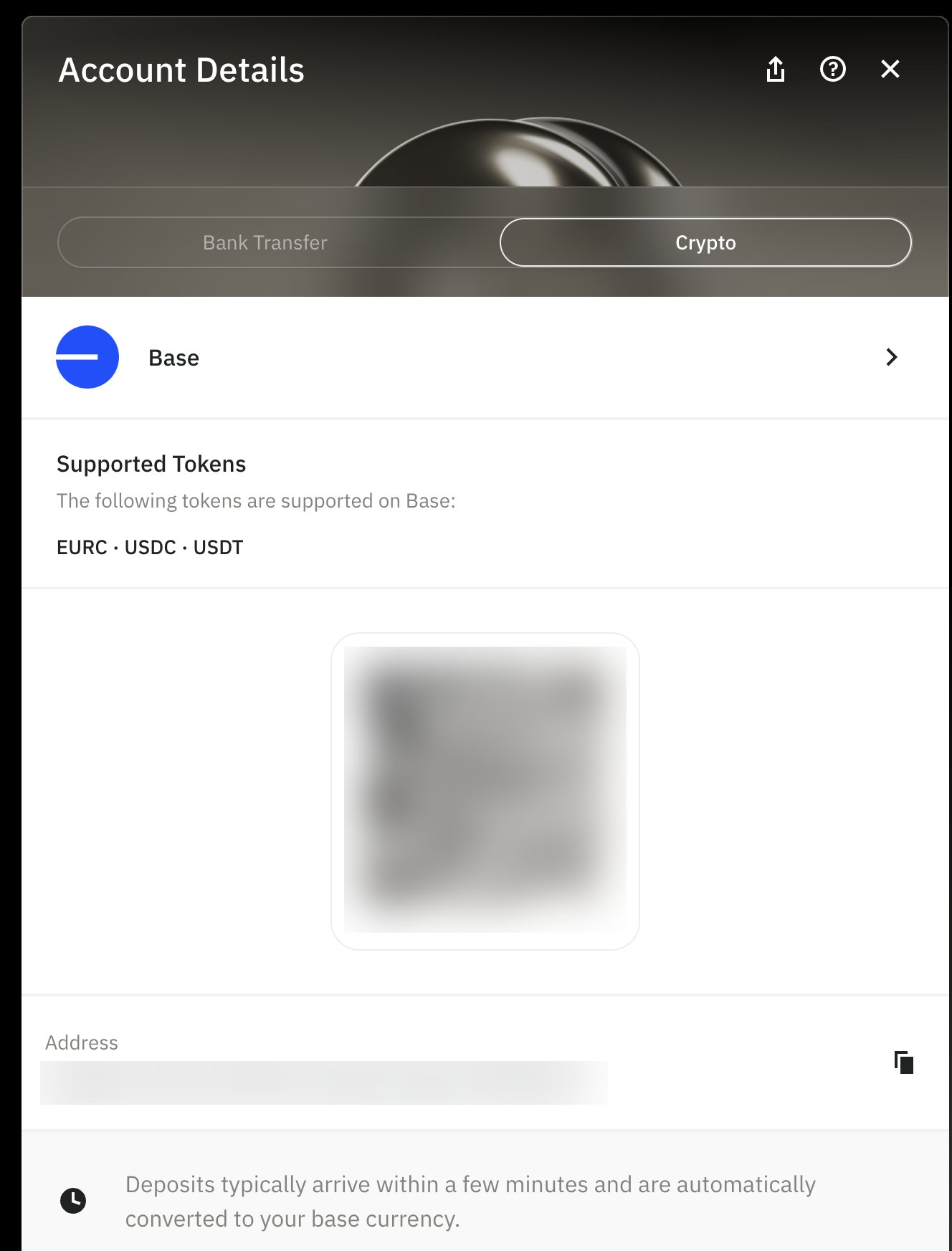
2
Choose the network they're sending from
Base, Arbitrum One, BNB Smart Chain, Ethereum, OP Mainnet, Polygon, Kaia, Tron, Solana or Stellar.Rhino.fi: one persistent address per chain family, monitored across every supported chain; deposits are bridged and converted before settlement.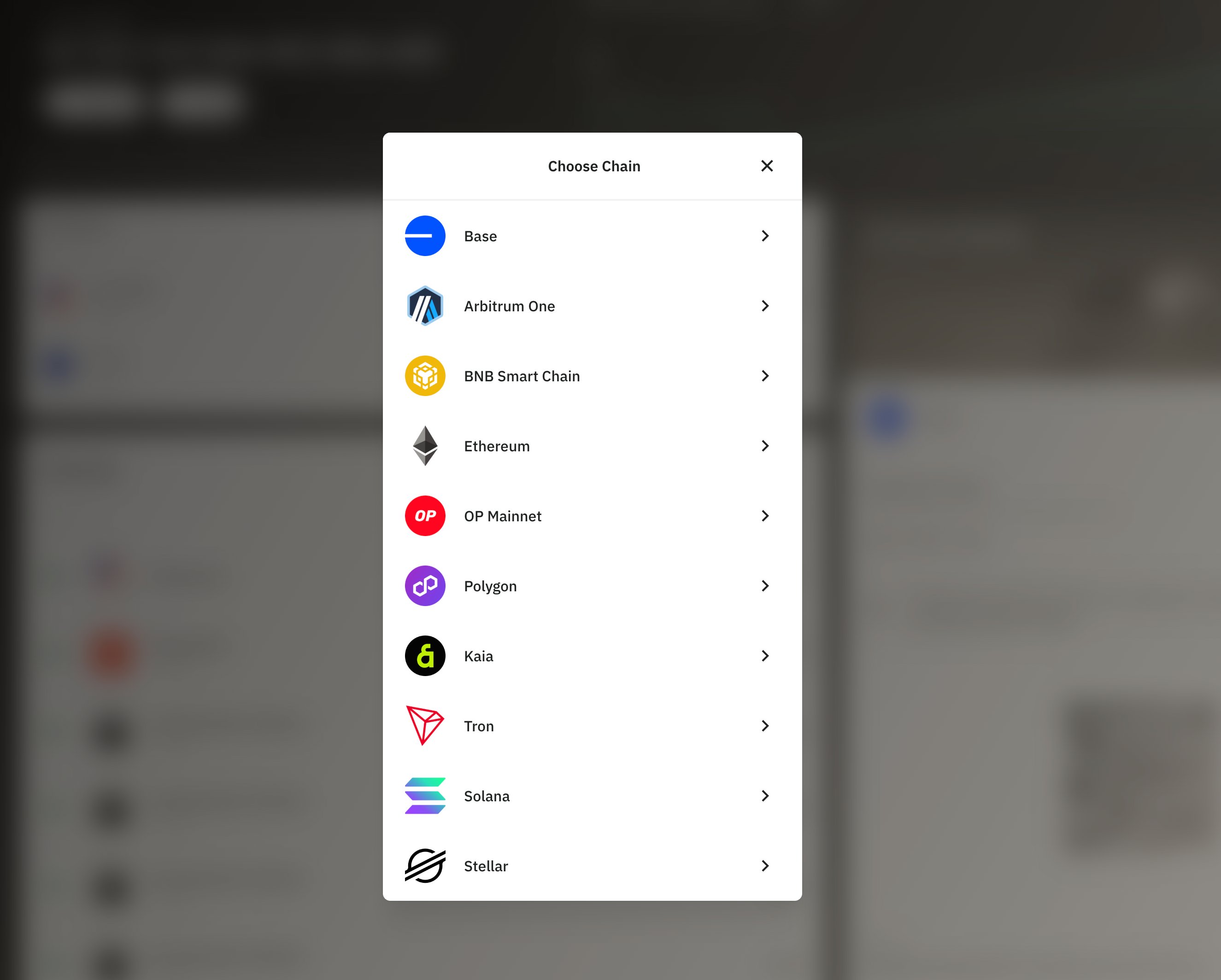
3
Deposit received and credited
The customer sends stablecoins to their address, and the funds appear in their Wirex Business account converted to their base currency, usually within a few minutes.Rhino.fi: detects the deposit, screens it for KYT/AML, settles it to Wirex’s treasury and confirms by webhook, which is when Wirex credits the customer’s balance.
Outcome
“Wirex’s mission is to make stablecoin complexity invisible. Users should see a bank account, not a bridge or a chain.” — Daniel Rowlands, General Manager, WirexYour customers can fund their accounts from whichever network and stablecoin they already hold, using a single address that never changes. Your organisation gains predictable settlement into the treasury structure you choose, compliance screening on every inbound transaction, and no multi-chain infrastructure to build, operate or maintain. For integration support, contact Rhino.fi support or your account manager.